A practical guide to managing multiple WordPress sites


Managing one WordPress website already feels like a full-time job. Managing several sites at once is where things really can start to feel stressful. Plugin updates pile up, login details get scattered, renewals sneak up on you, and even simple tasks like checking backups or opening wp-admin can turn into a string of repetitive clicks.
That is why many site owners are looking for a better way to manage multiple websites. EasyWP gives you several tools to help you successfully streamline the old way of doing things. Instead of building a traditional WordPress multisite network, you can run multiple containerized WordPress sites from one EasyWP dashboard, with dedicated resources on each subscription and a much simpler setup overall.
Why traditional WordPress multisite is not always the best solution
In theory, WordPress multisite lets you run several websites from one WordPress installation. In practice, though, multisite often creates a different set of headaches, especially for freelancers and small business owners who just want an easy way to manage sites for all their clients or brands.
Plugin problems
One common issue is plugin compatibility. Not every WordPress plugin behaves well in a multisite environment, and some tools need extra configuration or simply do not support multisite setups the way users expect. That can make testing, troubleshooting, and future scaling much more complicated.
Muddled user management
Permissions and user management can also get confusing. A traditional multisite network introduces super admins, site admins, network settings, and shared plugin and theme controls. If you are only trying to manage a few distinct websites, that level of complexity can feel like overkill.
Inconsistent infrastructure
Then there is the infrastructure issue. In a multisite network, the sites are tied together much more closely. That can make migrations, customizations, and security responses trickier, because changes at the core level affect every site in the group.
How EasyWP makes multiple site management simpler
EasyWP was created to remove some of the most common headaches from WordPress hosting, and that becomes even more useful when you manage more than one site. Instead of forcing all your websites into one multisite installation, EasyWP lets you host multiple, custom-configured WordPress installations and access them from a single login and dashboard.
From that dashboard, your websites appear in one unified list, making it easy to jump between projects without juggling separate passwords and 2FA codes.
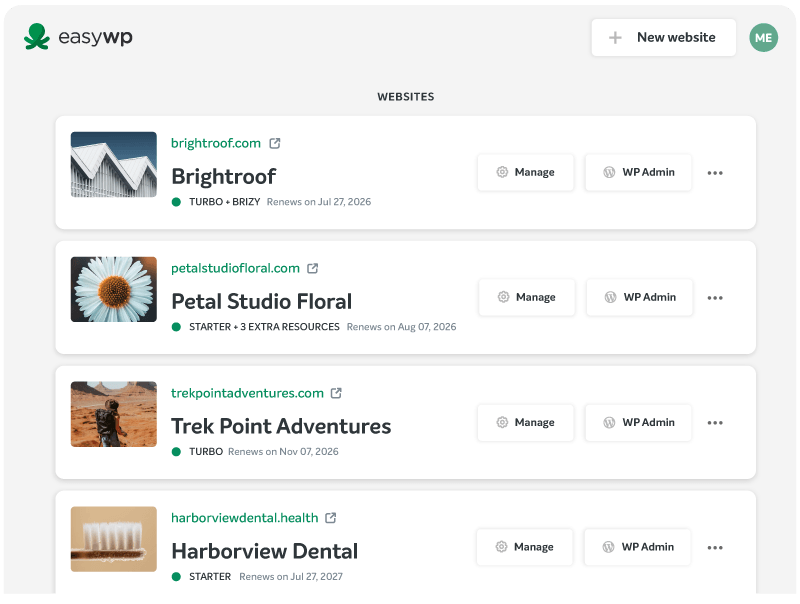
At a glance, you can quickly view an organized set of details for all of your sites.
- Domain
- Site title
- Hosting plan
- Link to manage site settings
- Link to manage each site
- Link to change your WordPress password
This is especially helpful if you manage different kinds of websites. Maybe you run a personal blog, an e-commerce site, a lead-gen landing page, and a client project or two. With EasyWP, each one can stay independent, but the day-to-day management experience still feels centralized and organized.
Another major benefit is the way subscriptions are structured. Each EasyWP site runs on its own subscription and uses cloud-based, containerized resources. That means one site having a traffic spike or a plugin issue does not affect your other sites, something you do have to worry about with an old-school WordPress multisite setup.
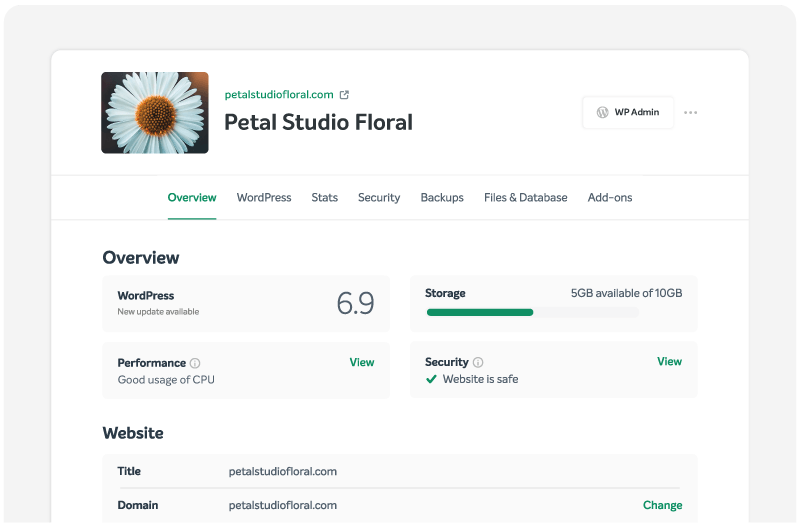
The dashboard also helps with routine work that always seems to multiply when you own several websites. Things like backups, SSL management, WordPress access, renewal visibility, and security settings are all easier to reach when they live inside the same environment. It turns repetitive maintenance into something much more manageable.
Why the wider Namecheap ecosystem matters
Managing multiple websites is, of course, not just about the hosting. You also need domains, business email, security, and sometimes a few extra tools that help your online presence feel complete. One of the biggest advantages of using EasyWP is that it sits inside the larger Namecheap ecosystem, so those pieces are much easier to reach and manage together.
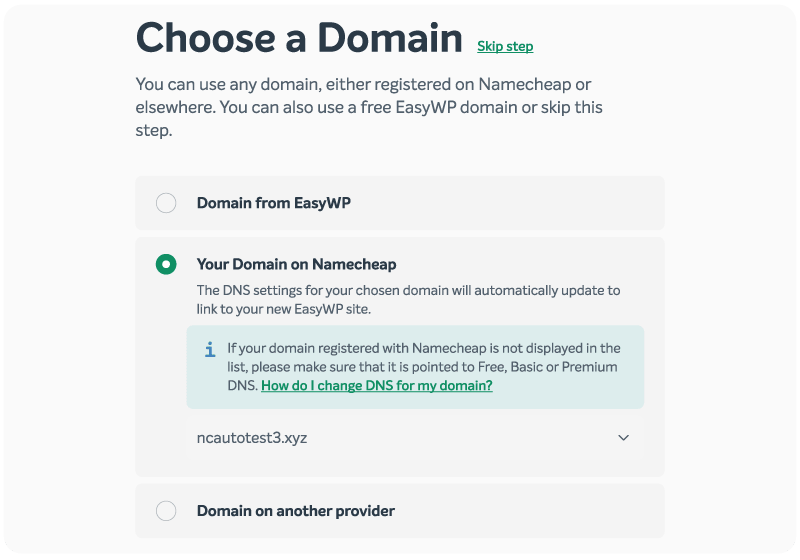
For example, if you register your domains with Namecheap, connecting them to EasyWP is straightforward. You are not bouncing between different providers just to point DNS records or sort out basic domain settings. That is a real time saver when you have several websites under your care.
Email is another big one. If each website needs its own branded email address, Namecheap Private Email gives you a direct way to create inboxes tied to your domains. That makes it much easier to keep communication professional across multiple brands, projects, or client-facing sites.
When people talk about saving time with managed WordPress hosting, this is a big part of what they mean. It is not only the server setup that gets easier. It is the entire process of managing the online tools around your websites.
The free extras that can add up fast elsewhere
One of the frustrations of managing several websites is that little add-ons often become per-site expenses. Something that seems inexpensive on one website can start to feel much less affordable when you multiply it by three, five, or ten.
EasyWP and Namecheap help reduce that pressure by including several useful features for free.
- Free SSL helps secure your website traffic and gives visitors the HTTPS protection they expect.
- Free CDN support helps speed up content delivery, which becomes especially useful when your sites serve visitors from different locations.
- Free MalwareGuardian adds another layer of protection by scanning for threats that could otherwise go unnoticed. Turbo and Supersonic plans come with free Autoclean protection, which automatically detects new threats and removes infections when needed.
- Free HackGuardian and WordPress Automatic Updates help lock down key files and reduce risk from outdated software.
- Free domain Privacy Protection is included for life on most eligible domains registered with Namecheap.
- Free DNS hosting is also available for most supported TLDs, adding an extra layer of DNS security to help protect your domain traffic.
Individually, each of these features is useful. Across multiple websites, they become even more valuable because they reduce the number of extra products you have to buy and manage site by site.

A simpler way to grow a multi-site setup
If you need to manage multiple WordPress websites, EasyWP gives you a practical alternative to the complexity of traditional multisite. You still get the convenience of one central dashboard, without the need for all of your sites to share the same resources.
When you combine that with the broader Namecheap ecosystem, plus free security and performance tools that many hosts charge for separately, the result is a setup that feels much more realistic for busy site owners.
To check out more tools that help busy freelancers and bloggers, read our guide to some of the best productivity tools for WordPress users.
FAQ: Managing multiple WordPress sites
You can run multiple WordPress sites under a single Namecheap account with EasyWP. Each site uses its own EasyWP subscription with dedicated resources and its own WordPress installation, but all of them appear together in one unified dashboard list for easier management.
No. You sign in once to your Namecheap account, then access all of your EasyWP sites from the same dashboard. From there, you can jump into each site’s management area or WordPress admin without juggling separate usernames and passwords. Once you are inside the WordPress installation for each site, you can add additional users with their own login and password credentials.
Yes. EasyWP plans are priced so you can run multiple sites without your costs getting out of control. Even though each website has its own subscription and dedicated resources, the monthly pricing stays competitive compared to many shared or managed hosts, especially once you factor in the free extras like SSL, CDN, MalwareGuardian, and other security tools that other providers often charge for on a per-site basis.


More articles from us!