Free SSL for EasyWP customers


Thanks to the rise of cyber threats, people are looking for signs that your website is secure from the moment they land. Industry surveys have found that most users feel more confident on sites that display HTTPS and familiar security indicators like the padlock. And that’s what you get with our free SSL Certificate.
All EasyWP hosting plans now include a free Let’s Encrypt SSL Certificate for the lifetime of the plan.
SSL encrypts the connection between your website and its user’s browser. The added security layers prevent data breaches for websites large and small and protect user privacy. What’s more, it shows your visitors you take their security seriously right from the URL.
Factor in our improved interface for installing and managing SSL Certificates, and you’ve got next-level security, free and simple.

Let’s Encrypt for everyone
Let’s Encrypt is a nonprofit certificate authority that has helped millions of websites move to HTTPS by providing free, trusted SSL certificates. Backed by a broad community of industry supporters and used across the web, it has become one of the most recognized ways to enable modern TLS encryption that is trustworthy and automated.
Running a small business already comes with risks, and keeping your website secure should not be one of them. That is why EasyWP includes free Let’s Encrypt certificates for businesses and individuals who take their security seriously, giving you strong encryption and browser trust indicators.
Let’s Encrypt SSL is also easy to activate on your domain and EasyWP site. A few clicks in the EasyWP dashboard are all it takes to turn on HTTPS, and the setup process follows the same simple steps outlined later in this article.
SSL security helps your visitors trust you
SSL is an important tool for building trust in your visitors and increasing sales. When a website is secured with SSL, the URL is prefixed with HTTPS (the extra S stands for secure) instead of HTTP. A padlock will also display in your visitor’s address bar so people know your site is safe.

SSL isn’t just important for security. Since 2014, Google has indicated that https is a ranking signal, and a website using SSL would receive a small search benefit. Google has also suggested that HTTPS may break the tie between two equal search engine results. If your website is equal to your competitor’s website in terms of content, speed, etc, displaying HTTPS could make sure you rank higher. So, if you want to stay competitive in web searches, SSL is a must for your website.
Add Let’s Encrypt to your website in a snap
Adding Let’s Encrypt with EasyWP is easy and efficient. In most cases, certificates are issued and installed in 15 minutes or less. It doesn’t involve any legal documents. You just have to follow an automated validation process that only checks domain ownership.
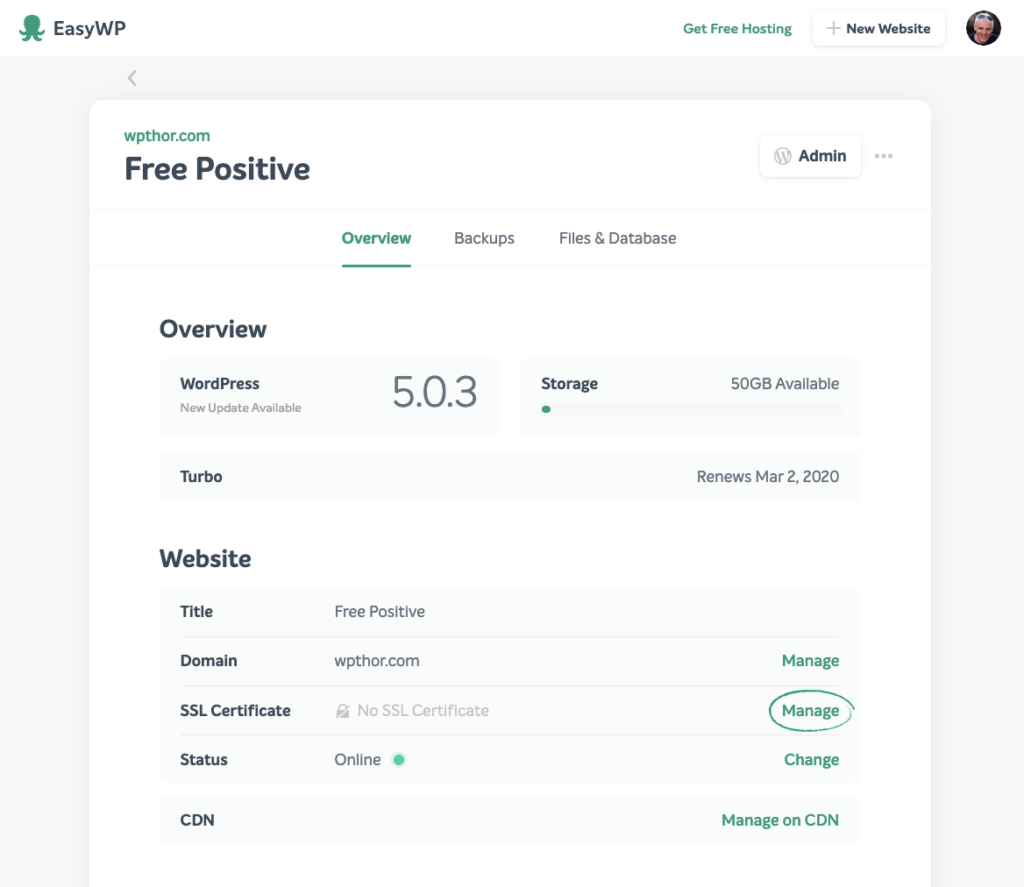
- Log in to EasyWP. From your dashboard, navigate to SSL Certificate and click ‘Manage’
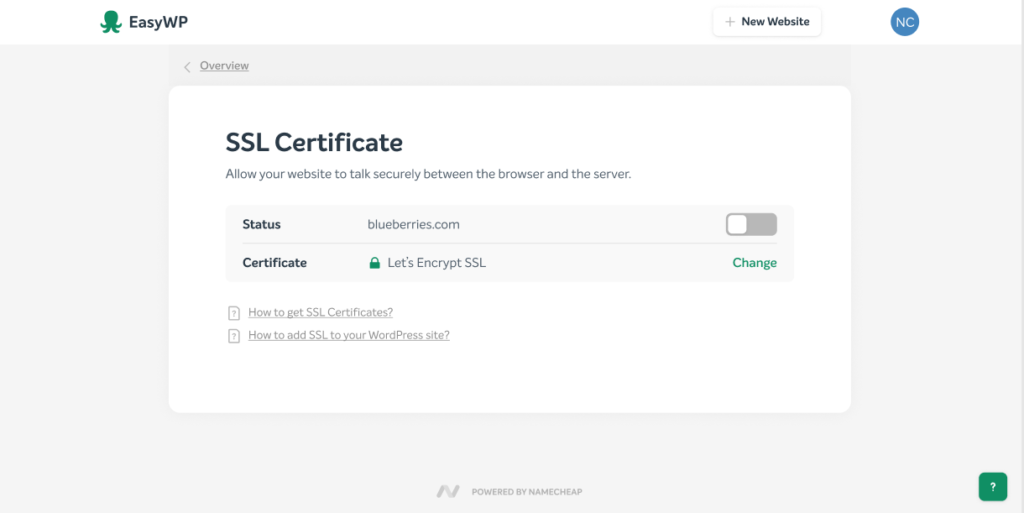
- Click Add, then select ‘Free Let’s Encrypt’
- Click ‘Change’ to enable your Let’s Encrypt Certificate
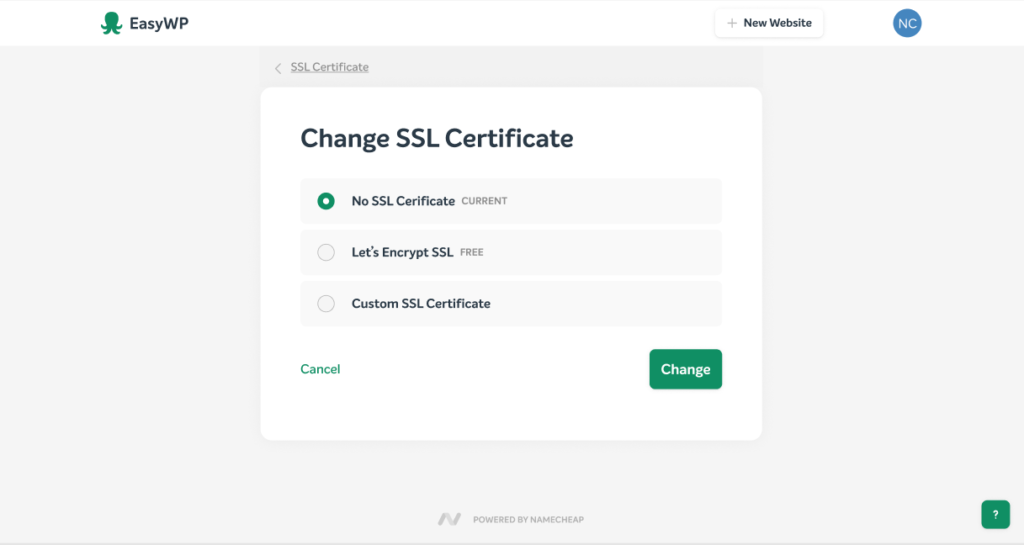
It’s as simple as that.
Now you’re done, EasyWP gets to work activating your SSL Certificate. This can take a few hours. In the meantime, feel free to close this window and carry on with your business. The SSL renewal will be performed automatically by EasyWP at no cost.
Secure your site today
When your website is safe, you can focus on things like building your business, content creation and any other online interactions without worrying about internet threats and the unwanted costs associated with them. Having a free Let’s Encrypt means having exactly what your business needs to grow safely in the digital world.
At EasyWP, we pride ourselves in including the best security products like Let’s Encrypt to promote an open internet that’s safe for everyone. So stay secure out there.
FAQ: Using SSL with EasyWP
No. Once you enable the free Let’s Encrypt SSL in your EasyWP dashboard, renewals are handled automatically for the lifetime of your plan. You do not need to generate new certificates, upload files, or repeat the validation process every few months. As long as your EasyWP subscription stays active and your domain remains correctly pointed, your SSL coverage will quietly renew in the background.
Yes. If you prefer to use a custom SSL certificate from another provider, you can upload and install it through the same SSL section in your EasyWP dashboard. The free Let’s Encrypt option is ideal for many sites, but some businesses may choose a different certificate type to meet internal policies or specific compliance requirements. In those cases, EasyWP lets you replace the free SSL with a custom SSL certificate, while still keeping the rest of your hosting and dashboard experience the same.
If you have turned on SSL but still see warnings, it usually means some images, scripts, or stylesheets are still loading over plain HTTP instead of HTTPS. Start by updating any hard coded http:// URLs in your theme settings, menus, and widgets, and check page builders or plugins for old links. You can also use a search and replace tool or plugin to update internal links in bulk. Once all assets load over HTTPS, the padlock should appear correctly and the warnings should disappear.


More articles from us!
The EasyWP Dispatch – WordPress gets ready for a new year

9 best WordPress security plugins to shield your site